Running Spark on Kubernetes: An Ops-First Approach
An ops-first pattern for production Spark on Kubernetes with one SparkApplication template, pre-baked images, and sub-10-second warm starts.
Every Spark-on-Kubernetes tutorial ends the same way: you deploy the spark-on-k8s-operator, submit spark-pi, see Pi is roughly 3.14, and declare victory. Production is a different story.
In practice, production workloads need dependency management for private JARs and Python packages, fast iteration, observability, cost attribution, and a way to avoid maintaining a separate SparkApplication YAML for every pipeline. Dozens of ETLs can share one templatized SparkApplication YAML, init containers that bootstrap the full runtime, and a pre-baked image toggle that cuts startup from ~5 minutes to under 10 seconds on warm nodes.
Keep sparkConf Minimal in the YAML
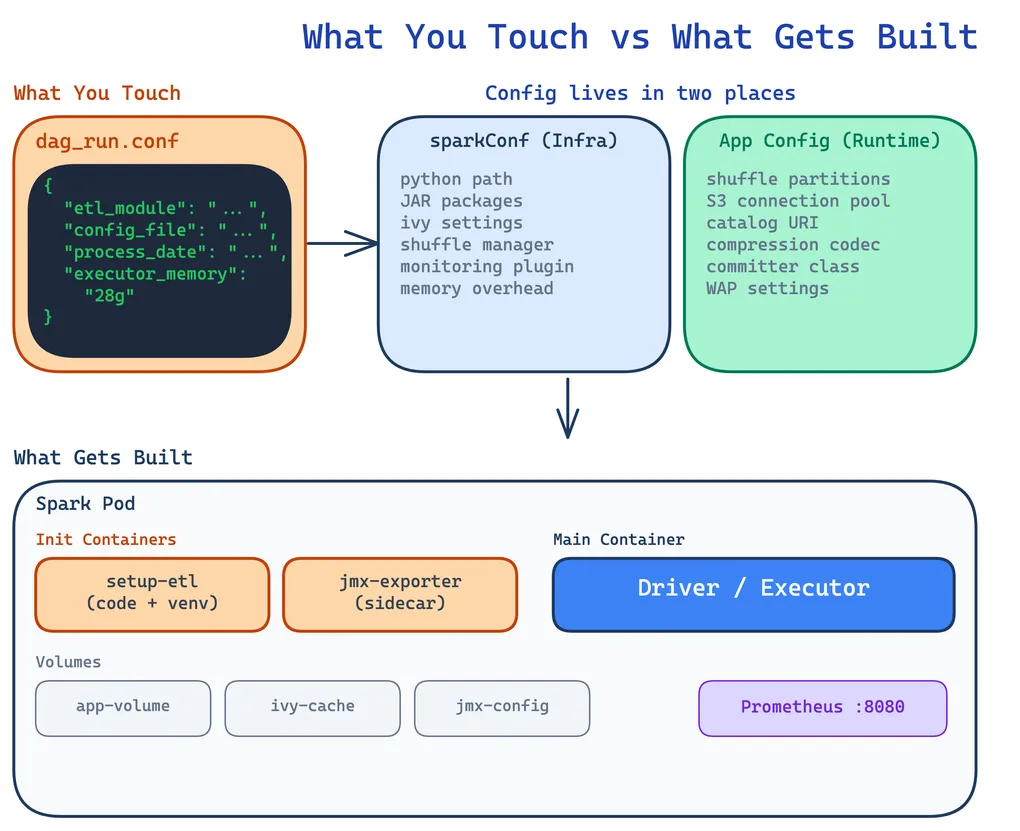
The first instinct is to stuff every Spark config into the SparkApplication YAML’s sparkConf section. Don’t. The YAML should contain only what spark-submit needs to launch the job — Python path, JAR coordinates, the shuffle manager, and monitoring plugins. Everything else belongs in your application’s own config files, where it gets loaded at runtime by the driver.
The shared SparkApplication YAML carries only the launch-critical settings:
sparkConf:  # Just enough to boot  spark.pyspark.python: "/app/.venv/bin/python3"  spark.kubernetes.memoryOverheadFactor: "0.2"
  # JAR dependencies (resolved by Ivy at spark-submit time)  spark.jars.packages: "org.apache.iceberg:iceberg-spark-runtime-4.0_2.13:1.10.0,org.apache.iceberg:iceberg-aws-bundle:1.10.0,org.apache.hadoop:hadoop-aws:3.4.1,<org>:spark-s3-shuffle_2.13:1.0.9,io.dataflint:dataflint-spark4_2.13:0.6.1"  spark.jars.ivy: "/ivy-cache"  spark.jars.ivySettings: "/app/ivysettings.xml"
Meanwhile, application-level config—loaded by the ETL framework when the driver starts—handles everything specific to the job:
spark_config: config: spark.sql.extensions: "org.apache.iceberg.spark.extensions.IcebergSparkSessionExtensions" spark.sql.shuffle.partitions: "200" spark.hadoop.fs.s3a.connection.maximum: "500" spark.hadoop.fs.s3a.threads.max: "500" spark.shuffle.s3.bufferSize: "268435456" spark.reducer.maxSizeInFlight: "256M"Why split it this way? The YAML is infrastructure — it changes when you upgrade Iceberg or add a new JAR. The config file is application logic — it changes when a data engineer tunes shuffle partitions for a specific pipeline. They evolve at different speeds and are owned by different people. You don’t want to redeploy a Kubernetes manifest because someone changed a buffer size.
One YAML to Rule Them All
The real unlock is combining init containers with a standardized ETL framework directory structure. Every pipeline follows the same layout:
<project>/├── module_1/│ ├── etl_script.py│ └── config/│ ├── dev-daily.yaml│ └── dev-bulk.yaml├── module_2/│ ├── etl_script.py│ └── config/│ ├── dev-daily.yaml│ └── dev-bulk.yaml├── pyproject.toml└── uv.lockThe init container runs from the base Spark image and executes an init.sh that bootstraps the full environment:
- Downloads ETL code from S3 (versioned artifacts)
- Creates a Python venv using
uvwith the project’suv.lockandpyproject.toml - Installs private Python packages from AWS CodeArtifact
- JARs get resolved via Ivy when
spark-submitruns (Maven Central first, CodeArtifact for private JARs)
initContainers: - name: setup-etl image: <registry>/spark:4.0.0-python3 command: ["/usr/local/bin/init.sh"] env: - name: ETL_VERSION value: "{{ dag_run.conf.get('etl_version', 'latest') }}" - name: S3_BUCKET value: <storage-bucket> - name: ETL_PROJECT_NAME value: analytics-etl - name: MODULE_NAME value: "{{ dag_run.conf.get('etl_module') }}" volumeMounts: - name: app-volume mountPath: /appBoth the driver and executor pods run the same init container, mounting the same emptyDir volume at /app. By the time the Spark process starts, the code, venv, and config files are all in place.
The IvySettings Sidecar
There’s a subtlety with private JARs. When the operator controller runs spark-submit, it resolves spark.jars.packages through Ivy before the driver pod even exists. That means the controller pod itself needs valid Ivy credentials — not just the driver.
A sidecar on the operator controller solves this by refreshing an AWS CodeArtifact token every 5 minutes and generating an ivysettings.xml:
<ivysettings>    <caches defaultCacheDir="/ivy-cache"/>    <resolvers>        <chain name="chain" returnFirst="true">            <!-- Maven Central first (no auth, fast CDN) -->            <ibiblio name="central" m2compatible="true"                     root="https://repo1.maven.org/maven2/"/>
            <!-- CodeArtifact for private packages -->            <ibiblio name="codeartifact" m2compatible="true"                     root="https://<maven-registry>/<repo>/"/>        </chain>    </resolvers></ivysettings>
The sidecar mounts its output to a shared emptyDir, and the controller reads it as read-only. One gotcha: the operator controller’s root filesystem is read-only by default, so you must override spark.jars.ivy to a writable emptyDir path (like /ivy-cache). Without this, spark-submit fails with a cryptic permission denied on ~/.ivy2/cache.
Templatized YAML: Runtime Values from Airflow
One SparkApplication YAML serves all pipelines because everything is parameterized through Jinja2, with values coming from Airflow’s dag_run.conf at trigger time.
The application file, arguments, and resources are all templated:
mainApplicationFile: "local:///app/{{ dag_run.conf.get('etl_module') }}/{{ dag_run.conf.get('etl_script') }}"arguments: - "--config" - "/app/{{ dag_run.conf.get('etl_module') }}/{{ dag_run.conf.get('config_file') }}" {% if dag_run.conf.get('process_date') %} - "--process-date" - "{{ dag_run.conf.get('process_date') }}" {% endif %} {% if dag_run.conf.get('start_date') %} - "--start-date" - "{{ dag_run.conf.get('start_date') }}" {% endif %}Resource sizing uses sensible defaults but can be overridden per run:
driver: cores: {{ dag_run.conf.get('driver_cores', 6) }} memory: "{{ dag_run.conf.get('driver_memory', '20g') }}"executor: instances: {{ dag_run.conf.get('executor_instances', 4) }} cores: {{ dag_run.conf.get('executor_cores', 7) }} memory: "{{ dag_run.conf.get('executor_memory', '22g') }}"A typical trigger payload looks like:
{ "etl_module": "entity_rollup", "etl_script": "entity_rollup_daily.py", "config_file": "config/dev-daily.yaml", "process_date": "2026-03-15", "executor_instances": 8, "executor_memory": "28g"}Kubernetes labels on every driver and executor pod provide cost attribution:
labels: airflow-dag-id: "{{ dag.dag_id }}" airflow-task-id: "{{ task.task_id }}" airflow-execution-date: "{{ ds }}" etl-module: "{{ dag_run.conf.get('etl_module', 'unknown') }}"The labels feed cost monitoring by DAG, task, and ETL module.
Dynamic Node Affinity
Executor pods also support dynamic node affinity via dag_run.conf. The YAML templates executor node labels and affinity rules as Jinja2 loops:
executor: nodeSelector: dedicated: spark {% for key, value in dag_run.conf.get('executor_node_labels', {}).items() %} {{ key }}: "{{ value }}" {% endfor %} {%- if dag_run.conf.get('executor_node_affinity') %} affinity: nodeAffinity: preferredDuringSchedulingIgnoredDuringExecution: {%- for preference in dag_run.conf.get('executor_node_affinity', []) %} - weight: {{ preference.get('weight', 50) }} preference: matchExpressions: {%- for expr in preference.get('matchExpressions', []) %} - key: "{{ expr.key }}" operator: "{{ expr.operator }}" values: {%- for val in expr['values'] %} - "{{ val }}" {%- endfor %} {%- endfor %} {%- endfor %} {%- endif %}preferredDuringScheduling (soft affinity) lets Karpenter prefer the right instance type while retaining a fallback when those nodes are not ready. Karpenter provisions nodes reactively; a hard requirement would leave the pod pending, while a soft preference lets the scheduler place it on available capacity and adjust the fleet for the next task.
For example, to route a memory-heavy job to r-family instances with at most 16 CPUs per node:
{ "etl_module": "entity_rollup", "etl_script": "entity_rollup_daily.py", "config_file": "config/dev-daily.yaml", "process_date": "2026-03-15", "executor_instances": 8, "executor_memory": "28g", "executor_node_labels": {"spark-role": "mem-intensive"}, "executor_node_affinity": [ { "weight": 80, "matchExpressions": [ {"key": "karpenter.k8s.aws/instance-cpu", "operator": "Lt", "values": ["17"]}, {"key": "karpenter.k8s.aws/instance-category", "operator": "In", "values": ["r"]} ] } ]}No new YAML, no redeployment — just a different trigger payload. The same SparkApplication template handles general-purpose compute jobs and memory-intensive shuffle-heavy workloads.
The Cost
This approach is flexible — any new pipeline just needs to follow the directory convention and it works with the same YAML. But it comes at a cost: ~5 minutes of setup per job. The init container downloads code and creates the venv on both driver and executor pods, then Ivy resolves JARs.
That overhead adds up fast in production too. A DAG with 5 Spark tasks in its lineage wastes ~20 minutes just on setup — time where no actual data processing happens. Shaving 3-4 minutes per task compounds across every scheduled run, every day.
During development, the wait is more painful since you’re iterating rapidly. But once dependencies stabilize, you can switch to the pre-baked template and keep the standard one for when you’re experimenting with new packages or adding new JARs.
Pre-baked Images: From 5 Minutes to 10 Seconds
The fix is straightforward: bake dependencies into the Docker image. A spark:4.0.0-python3-pre-baked image includes the venv, pip packages, and JARs. Its init container downloads only the ETL code.
The toggle lives in the Airflow DAG. The SparkKubernetesOperator uses Jinja2’s {% raw %}{% include %}{% endraw %} to select which SparkApplication template to render based on dag_run.conf:
from airflow.providers.cncf.kubernetes.operators.spark_kubernetes import SparkKubernetesOperator
submit_etl = SparkKubernetesOperator(    task_id="submit_spark_etl",    namespace="spark",    application_file="{% include 'sparkapps/generic-spark-app'"                     " ~ dag_run.conf.get('sparkapp_suffix', '-pre-baked')"                     " ~ '.yaml' %}",    delete_on_termination=True,)
By default, sparkapp_suffix is "-pre-baked", so the DAG renders generic-spark-app-pre-baked.yaml. Passing "sparkapp_suffix": "" in the dag_run.conf switches to the standard image.
Here’s what changes between the two:
| Standard | Pre-baked | |
|---|---|---|
| Image | spark:4.0.0-python3 |
spark:4.0.0-python3-pre-baked |
spark.jars.packages |
Listed (downloaded at runtime) | Removed (already in image) |
ivy-cache volume |
Present | Removed |
| Init container | Downloads code + creates venv + resolves JARs | Downloads code only |
| App mount path | /app |
/app/etl (code alongside baked venv) |
| Startup (cold nodes) | ~5 min | ~1.5 min |
| Startup (warm nodes) | ~5 min | ~10 sec |
The startup time difference is dramatic. With pre-baked images and Karpenter keeping warm nodes in the spark NodePool, the driver starts executing stage tasks within 10 seconds of the SparkApplication being created. In production DAGs with multiple Spark tasks in sequence, only the first task takes the cold-node hit — subsequent tasks land on nodes that are already warm, so they start processing within 10 seconds.
The standard image remains useful while dependencies are changing. Once the package and JAR set stabilizes, rebuilding and returning to the pre-baked image restores fast startup.
Prometheus and JMX Monitoring
Every driver and executor pod runs a JMX exporter as a native sidecar (using Kubernetes’ restartPolicy: Always on an init container), exposing JVM and Spark metrics on port 8080:
- name: jmx-exporter image: <registry>/jmx-exporter:0.20.0 restartPolicy: Always ports: - containerPort: 8080 name: metrics args: - "8080" - /etc/jmx-exporter/config.yaml volumeMounts: - name: jmx-exporter-config mountPath: /etc/jmx-exporter/config.yaml subPath: config.yamlPrometheus annotations on the pods handle discovery:
annotations: prometheus.io/scrape: "true" prometheus.io/path: "/metrics" prometheus.io/port: "8080"At the operator level, the controller itself exposes metrics including job start latency histograms bucketed from 30s to 300s — useful for tracking whether your startup optimizations are actually working:
prometheus: metrics: enable: true port: 8080 endpoint: /metrics jobStartLatencyBuckets: "30,60,90,120,150,180,210,240,270,300"Dataflint can also run as a Spark plugin (spark.plugins: io.dataflint.spark.SparkDataflintPlugin), adding Iceberg-aware query profiling on top of the standard Spark UI for scan and S3 I/O diagnosis.
Operational Lessons
Separate infrastructure config from application config. The SparkApp YAML is infrastructure — it changes when you upgrade a JAR or add a volume. The application config file is business logic — it changes when you tune shuffle partitions or add a data source. They evolve at different speeds and should be owned by different people.
Init containers are flexible but slow; pre-bake when dependencies stabilize. The init container approach lets you iterate on dependencies without rebuilding images. But once your pyproject.toml and JAR list are stable, baking them into the image drops startup from 5 minutes to seconds. Keep both paths and toggle between them.
The operator controller’s filesystem is read-only. This catches everyone. Override spark.jars.ivy to a writable emptyDir path, or spark-submit will fail with a permission error trying to write to ~/.ivy2/cache.
Test your Jinja2 templates. A missing key in dag_run.conf doesn’t give you a Python traceback — it gives you a cryptic Kubernetes API error about invalid YAML. Validate templates before relying on them in production DAGs.
Label everything from day one. Kubernetes labels on Spark pods (DAG ID, task ID, ETL module) feed directly into cost attribution. Adding them later means backfilling dashboards and losing historical data. Start with labels on day one.